
Overview
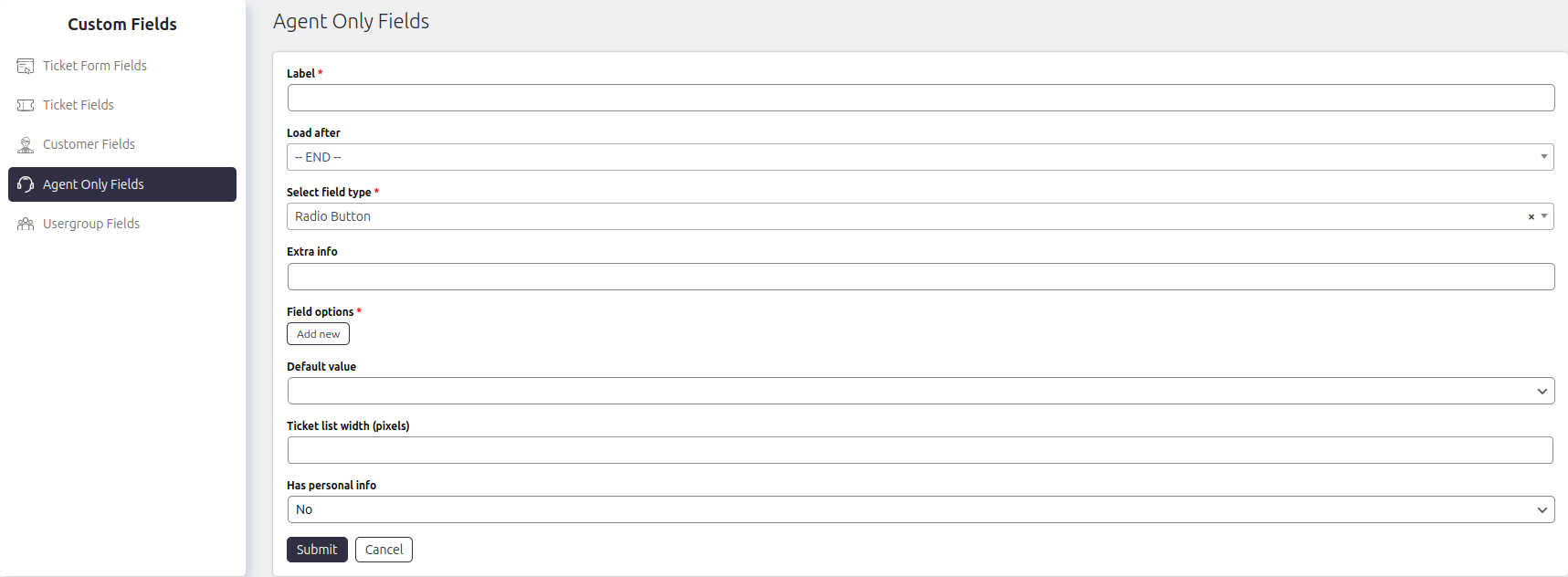
Agent Only Fields are similar to Ticket Fields but are designed exclusively for internal use by support agents. These fields are not visible to customers and are typically used to store internal notes, classifications, or sensitive information related to a ticket.
Where to Find
Go to: SupportCandy → Custom Fields → Agent Only Fields
How It Works
- Functionally, Agent Only Fields behave the same as Ticket Fields
- The key difference is visibility:
- Agents can view and update these fields
- Customers cannot see them
These fields are useful for storing internal data that should not be exposed to customers.
Step-by-Step Guide
Create a Ticket Field
- Go to Support → Custom Fields → Agent Only Fields.
- Click Add New.
- Select the field type you want to create.
- Configure the available field settings.
- Click Submit.
Add the newly created field to the ticket form from Support → Custom Fields → Agent Only Fields.
Options / Settings
- Label: Specifies the display name of the field shown on the ticket form and within the ticket details.
- Load After: Determines the position of the field by placing it after another field in the ticket form.
- Extra Info: Displays additional instructions or helpful information below the field on the ticket form.
- Default Value: Sets a default value that is automatically assigned if the field is left empty when the ticket is created.
- Auto-fill in Ticket Form: Automatically fills the field with the configured default value when the New Ticket form is displayed.
- Character Limit: Sets the maximum number of characters that users can enter in the field.
- Placeholder: Displays placeholder text inside the field before the user enters a value.
- Ticket List Width: Specifies the width (in pixels) of the field’s column when displayed in the ticket list.
- Date Display As: Determines how date values are displayed. Available options include:
- Date – Displays the actual date.
- Relative Time – Displays the difference from the current date (for example, 2 days ago).
- Date Format: Specifies the format used to display dates. If left empty, SupportCandy uses the default date format configured in General Settings.
- Has Personal Info: Indicates whether the field stores personal information.
- When enabled, the field is included in personal data exports to help comply with privacy regulations such as GDPR.
- Field Options: Allows you to define the available options for supported field types, such as dropdowns, radio buttons, and checkboxes.
Update Agent Only Fields in Tickets
Agents can update these fields directly from the ticket interface.
Requirement
- The agent must have the capability:
Change agent only fields
How to Update
- Open a ticket
- Locate the Agent Only Fields widget
- Update the required values
- Save changes
Example
Suppose your team wants to track internal ticket priority:
- Create an Agent Only Field named Internal Priority
- Agents update this field while handling tickets
- Customers will not see this field unless it is added to their ticket list view
Notes / Tips
- Use Agent Only Fields for internal tracking such as:
- Internal notes
- Agent remarks
- Internal categorization
- Restrict access using agent capabilities for better control
- Avoid exposing sensitive fields in customer ticket lists unless necessary
- Keep naming clear so agents can quickly understand field purpose