
Overview
Support agents are responsible for managing and responding to customer tickets in SupportCandy. If you have dedicated support staff, you can add existing WordPress users as support agents and assign them an appropriate Agent Role.
Where to Find
Go to: Support → Support Agents → Agents
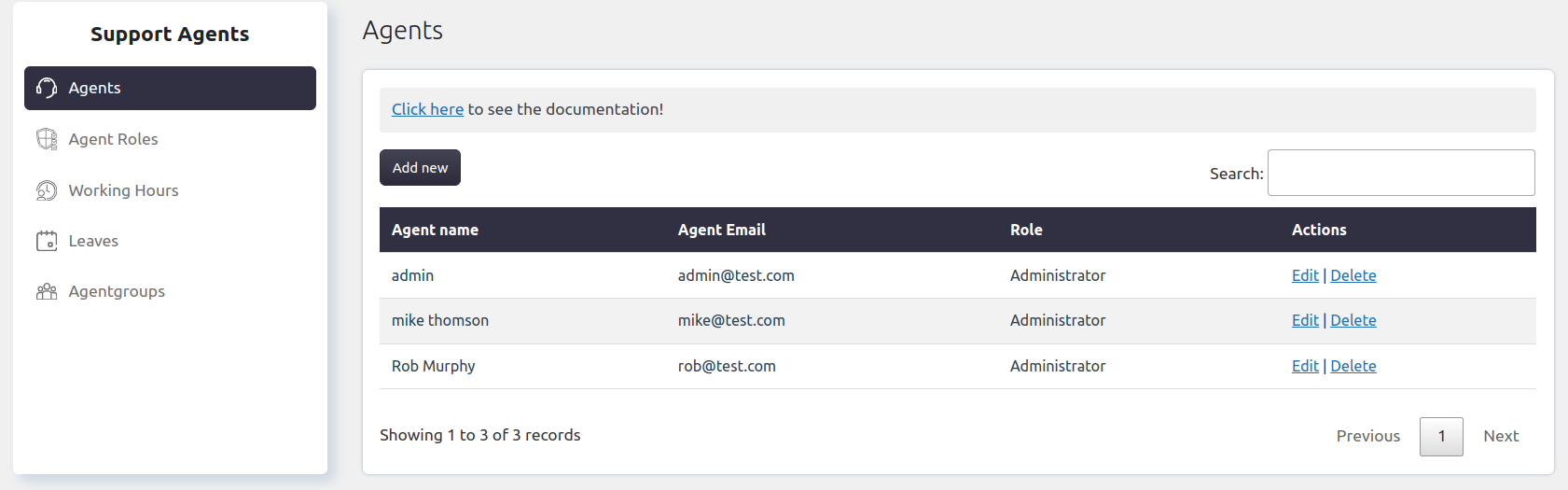
Support agents are responsible for managing and responding to customer tickets in SupportCandy. If you have dedicated support staff, you can add existing WordPress users as support agents and assign them an appropriate Agent Role.
How It Works
SupportCandy allows you to add existing WordPress users as support agents. Each agent is assigned an Agent Role, which determines the actions they can perform and the tickets they can access.
Only users who already exist in your WordPress website can be added as support agents.
Step-by-Step Guide
- Go to Support → Support Agents → Agents.
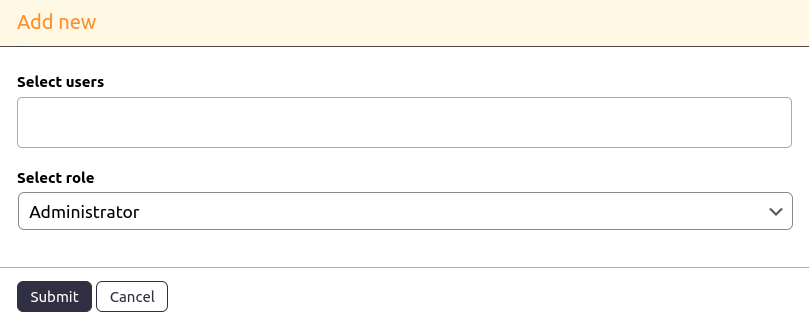
- Click Add New.
- Select one or more existing WordPress users.
- Choose an Agent Role for the selected users.
- Click Submit to add the selected users as support agents.
Options / Settings
WordPress Users: Select one or more existing WordPress users that you want to add as support agents.
Agent Role: Choose the role to assign to the selected users. The assigned role determines the permissions and capabilities available to the agent.
Example
Suppose the Out of SLA card displays 5 tickets.
Clicking the Out of SLA card opens the ticket list showing only those five tickets, allowing agents to prioritize and resolve overdue requests.
Notes / Tips
- Only existing WordPress users can be added as support agents.
- You can add multiple users at the same time.
- To learn more about agent permissions, see Agent Roles, Capabilities, and Permissions.