
Overview
The Timer add-on records and tracks the time spent on individual tickets. You can start and stop the timer from the individual ticket page and view the recorded time in the ticket list using the timer field.
Where to Find
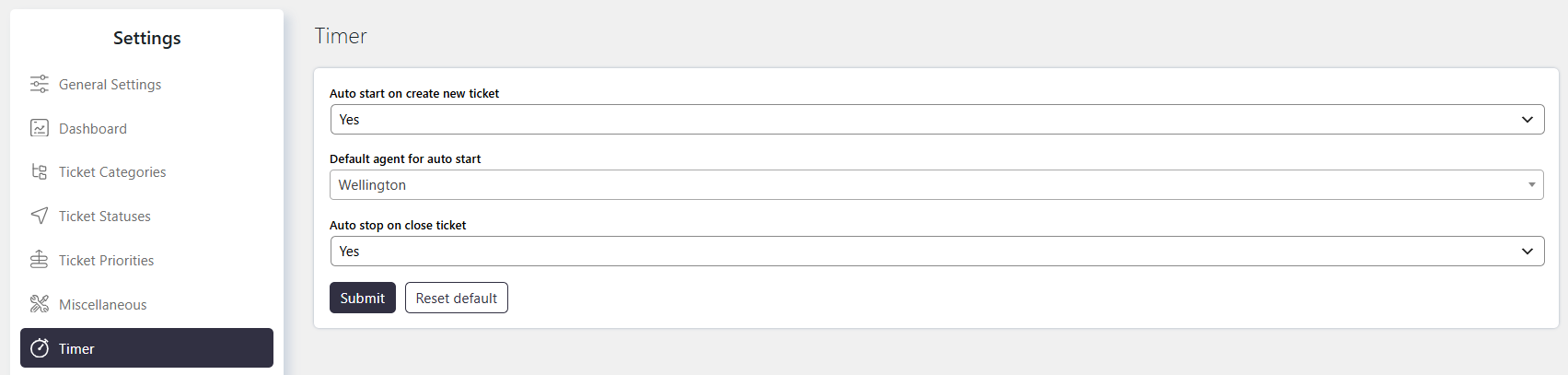
Go to Support → Settings → Timer.
How It Works
The Timer add-on records the time spent working on a ticket. The timer can be configured to start automatically when a ticket is created and stop automatically when the ticket is closed.
A timer widget is available on the individual ticket page. You can also add the timer field to the ticket list to view the recorded time for tickets.
Options / Settings
Auto Start on Create New Ticket
Enable this option to automatically start the timer when a new ticket is created.
When the timer starts automatically, the timer log is recorded under the Default Agent configured in the Timer settings.
Default Agent for Auto Start
Select the agent whose account should receive the timer log when Auto Start on Create New Ticket is enabled.
This setting applies only when automatic timer start is enabled.
Auto Stop on Close Ticket
Enable this option to automatically stop the timer when the ticket is closed.
This prevents the timer from continuing to record time after the ticket is closed.