
Overview
Agent Roles define what support agents can see and do in SupportCandy. By assigning different permissions to each role, you can control which actions agents are allowed to perform.
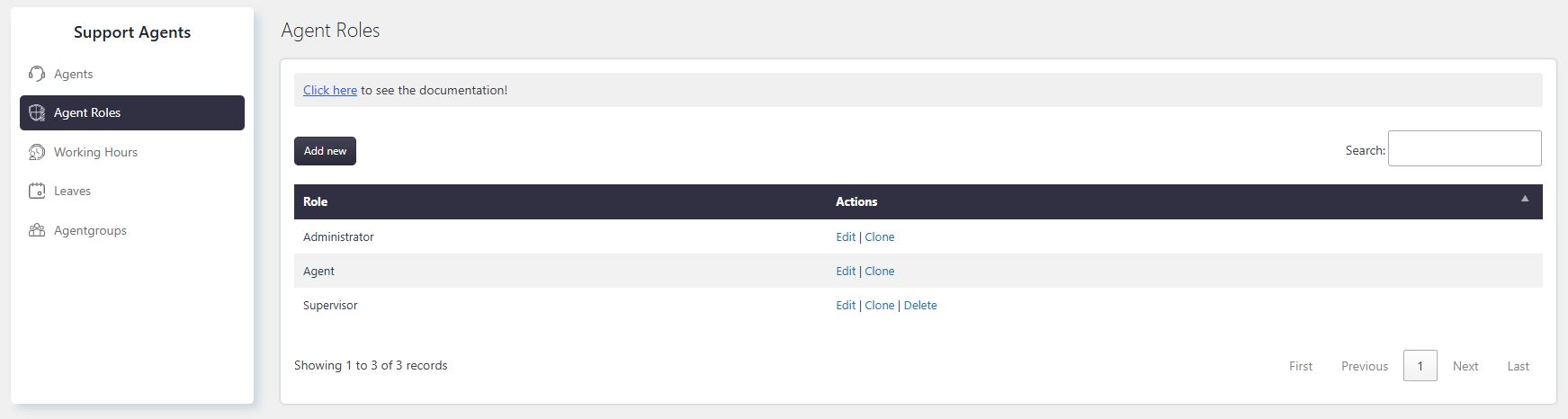
SupportCandy includes two default agent roles:
- Administrator – Has full access to all SupportCandy settings and features.
- Agent – Has access based on the permissions assigned to the role.
You can also create custom agent roles to match your support team’s responsibilities.
Where to Find
Go to: Support → Support Agents → Agent Roles
How It Works
Each support agent must be assigned an Agent Role. The permissions assigned to that role determine what the agent can access and modify.
Permissions can be configured separately for different ticket types, allowing you to control what agents can do depending on whether a ticket is assigned to them, assigned to another agent, or unassigned.
Step-by-Step Guide
Create a New Agent Role
- Go to SupportCandy → Support Agents → Agent Roles.
- Click Add New.
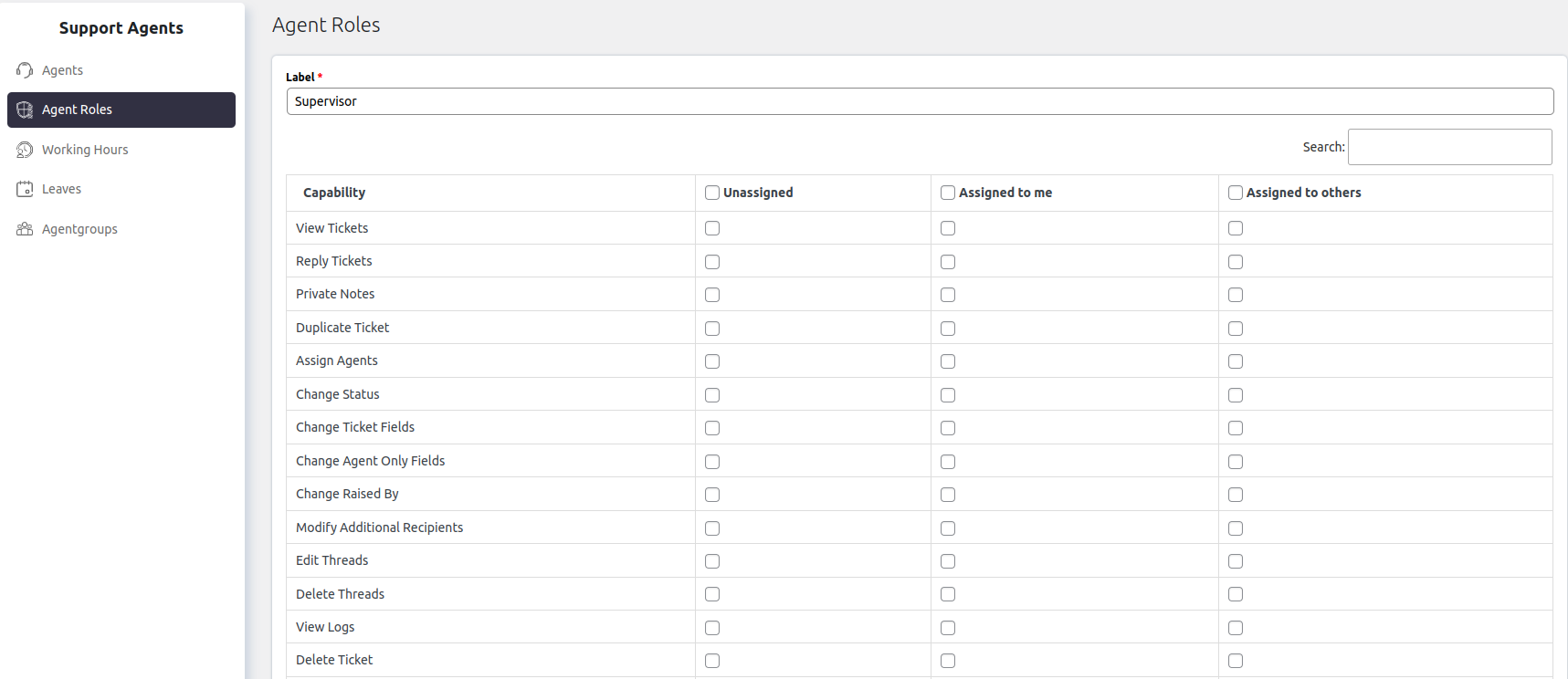
- Enter a name for the new role.
- Configure the required permissions.
- Click Save.
Options / Settings
Permissions can be configured separately for the following ticket types.
Unassigned: Applies to tickets that have not been assigned to any support agent.
Assigned to Me: Applies to tickets assigned to the currently logged-in agent.
Assigned to Others: Applies to tickets assigned to another support agent.
Ticket Capabilities
| Capabilities | Description |
|---|---|
| View Tickets | Allows agents to view ticket details. Agents can always view tickets they create. |
| Reply to Tickets | Allows agents to reply to tickets. Agents can always reply to tickets they create. |
| Private Notes | Allows agents to create and view internal notes that are hidden from customers. |
| Duplicate Ticket | Allows agents to create a copy of an existing ticket. This is useful when similar issues need to be tracked separately. |
| Assign Agents | Allows agents to assign tickets to other support agents. |
| Change Status | Allows agents to change ticket status, category, and priority. |
| Change Ticket Fields | Allows agents to edit ticket fields and information. |
| Change Agent-Only Fields | Allows agents to edit fields that are visible only to support agents. |
| Change Raised By | Allows agents to change the customer associated with a ticket. |
| Modify Additional Recipients | Allows agents to add or edit additional recipients who receive ticket notifications. Ticket creators always have this permission for their own tickets. |
| Edit Threads | Allows agents to edit existing ticket conversations. |
| Delete Threads | Allows agents to delete ticket conversations. |
| View Logs | Allows agents to view the ticket activity history. |
| Delete Tickets | Allows agents to delete and restore tickets. |
| Modify Tags | Allows agents to add, edit, or remove ticket tags. |
| Archive Ticket | Allows agents to move tickets to the archive. Archived tickets are hidden from the active ticket list but can be accessed later if needed. |
| View Credentials | Allows agents to view private credentials submitted in tickets. |
| Modify Credentials | Allows agents to edit private credentials submitted in tickets. |
| Delete Credentials | Allows agents to delete private credentials submitted in tickets. |
| Modify Checklist | Allows agents to update the checklist assigned to a ticket. |
| Modify User Group | Allows agents to change the user group assigned to a ticket. |
| Trigger Workflow | Allows agents to manually trigger workflows for applicable tickets. |
Ticket Permission
These permissions control access to additional SupportCandy features.
| Permission | Description |
|---|---|
| WP Dashboard Access | Allows agents to access the WordPress Dashboard. Without this permission, agents can only access the front-end support portal. |
| Create Tickets on Others’ Behalf | Allows agents to create tickets for other customers. |
| Deleted Filter Access | Allows agents to view and manage deleted tickets. |
| Edit Customer Info | Allows agents to edit customer information directly from a ticket. |
| Dashboard Access | Allows agents to access the SupportCandy dashboard and statistics. |
| Archive Ticket Access | Allows agents to view and access archived tickets. |
| Archive Ticket Permanent Delete Access | Allows agents to permanently delete tickets from the archive. This action cannot be undone. |
| Pin Tickets Access | Allows agents to pin important tickets so they stay at the top of the ticket list for quick access. |
| Allow to Merge Ticket | Allows agents to merge multiple tickets into one. This is useful when duplicate or related tickets are created. |
| View Reports | Allows agents to access SupportCandy reports. |
| Modify Scheduled Ticket | Allows agents to edit scheduled tickets. |
| Modify Others’ Time Log | Allows agents to edit time logs created by other agents. |
Example
Suppose you want junior support agents to resolve tickets but prevent them from deleting tickets or changing customer information.
Create a new Junior Support Agent role and enable only the permissions they require, such as View Tickets, Reply to Tickets, and Change Status. Leave sensitive permissions, such as Delete Tickets and Edit Customer Info, disabled.
Notes / Tips
- Permissions are configured separately for each Agent Role.
- Agents can always access tickets they create, even if some permissions are restricted.
- Grant only the permissions required for each role to improve security.
- Test each Agent Role after configuration to ensure it has the expected level of access.