
Overview
The Automatic Close Tickets add-on automatically closes inactive tickets after a defined period.
You can select specific ticket statuses and set the number of inactive days before closing. The add-on can also send an email notification before closing a ticket.
Where to Find
Go to Support → Settings → Automatic Close Tickets.
How It Works
The add-on checks tickets with the selected statuses for inactivity.
When a ticket reaches the configured inactivity period, the system changes its status to the selected Close Status.
Options / Settings
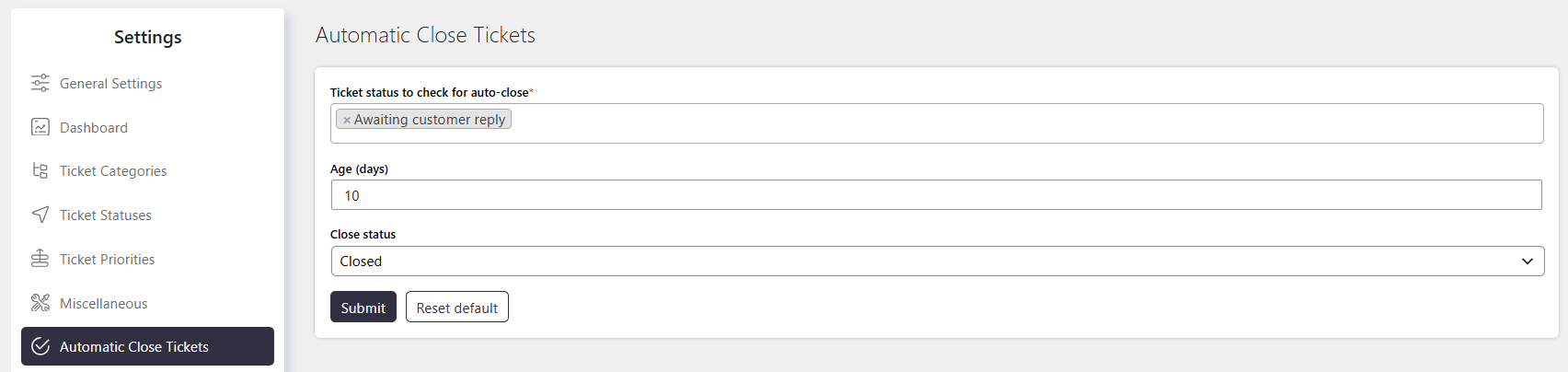
Ticket Status to Check for Auto-Close
Select the ticket statuses that should be checked for automatic closing.
Tickets with the selected statuses are closed after the configured number of inactive days.
Age (days)
Set the number of inactive days after which a ticket should be automatically closed.
For example, enter 10 to close tickets after 10 days of inactivity.
Close Status
Select the ticket status to assign when a ticket is automatically closed.
You can add or manage close statuses from:
Support → Ticket List → More Settings → Advanced
Notes / Tips
- Select only the ticket statuses that should be automatically closed.
- Set an appropriate inactivity period before closing tickets.
- The add-on sends an email notification before closing tickets when configured.
- Use Close Status to control the status assigned to automatically closed tickets.