
Overview
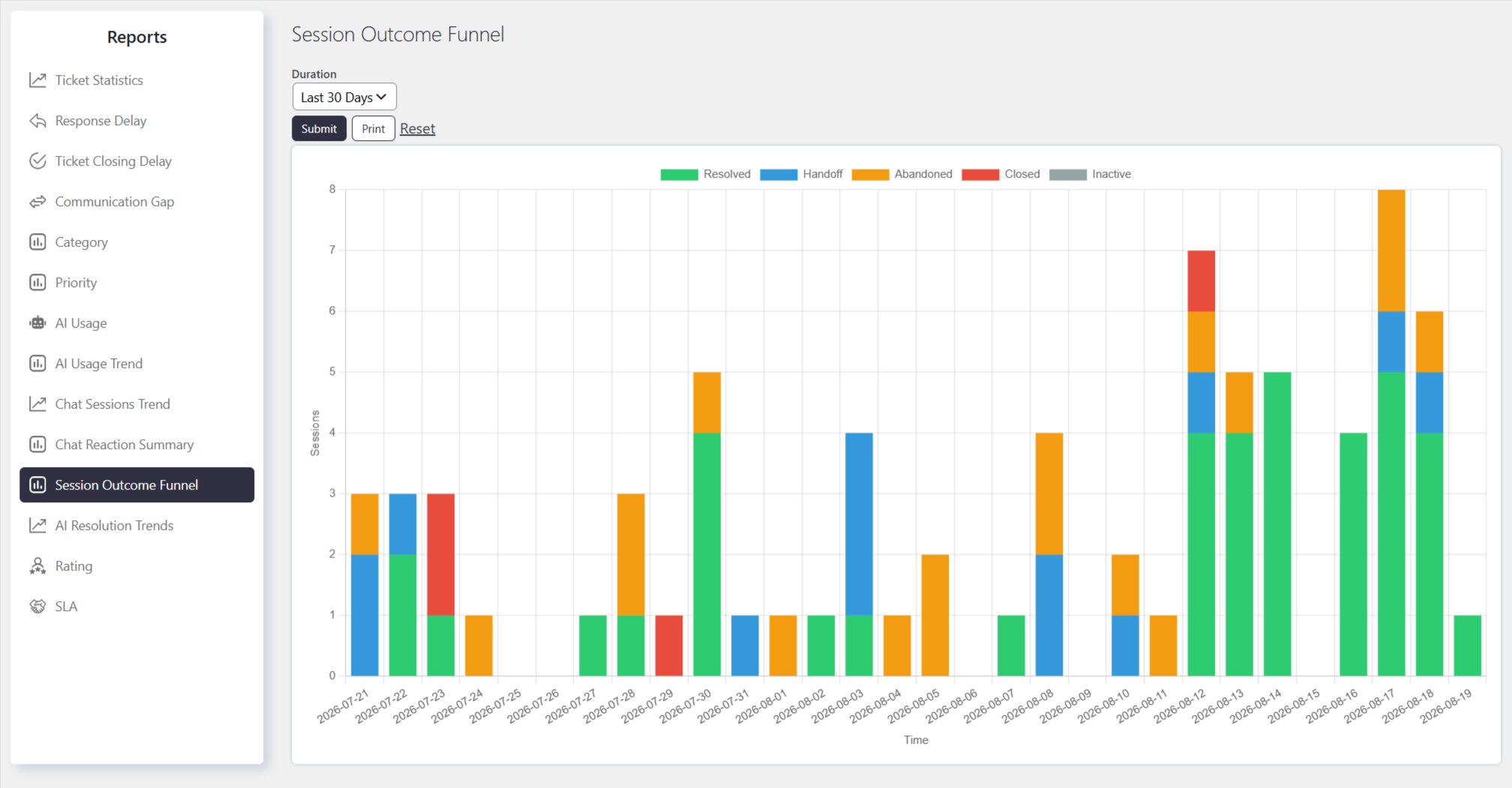
The Session Outcome Funnel report breaks down how chatbot sessions ultimately ended over your selected date range. Rather than a strict step-by-step funnel, it shows a stacked view of final outcomes — resolved by the bot, handed off to an agent, abandoned, closed, or left inactive — so you can see the overall mix of how conversations wrap up and spot shifts in that mix over time.
Where to Find
Go to Support → Reports → Session Outcome Funnel
How It Works
The report displays a graph with the following types of data:
- Resolved — sessions the bot successfully closed out on its own
- Handoff — sessions escalated to a human agent
- Abandoned — sessions the visitor left without reaching a resolution
- Closed — sessions ended in a closed state
- Inactive — sessions that went idle/timed out
These five outcomes are plotted as a stacked bar chart over the selected period, bucketed by day/week/month/year depending on the duration you choose, with each bar’s segments showing the outcome mix for that time slice.
You can select a predefined duration or choose a custom date range. You can also apply custom filters to generate more specific results.
Filtering the Report
You can generate the report for different time periods, such as:
- Last 30 days
- This week
- Last quarter
Notes / Tips
- Despite the name, this isn’t a sequential drop-off funnel. Each outcome is an independent, mutually exclusive count by final status — “Resolved” sessions aren’t a subset of “Handoff” or vice versa. Read it as an outcome breakdown, not a stage-by-stage conversion funnel.
- Sessions still in progress (Active) are excluded entirely. Only sessions that reached a terminal state within the selected period are counted — an ongoing conversation won’t appear in any bucket until it resolves, hands off, or times out.
- A rising “Abandoned” or “Inactive” share is a bot-effectiveness signal. If these segments grow relative to “Resolved,” it may indicate the bot is failing to engage or answer effectively — cross-check with Chat Reaction Summary for the same period to see if satisfaction is also dropping.
- “Handoff” here doesn’t confirm a ticket was created. Escalation and ticket-creation correlation are tracked separately in the AI Resolution Trends / Escalation Rate report — use that if you need the handoff-to-ticket conversion specifically.