
Overview
Macros are placeholders used to insert dynamic information into SupportCandy content.
They can be used in areas such as email notifications, print tickets, replies, and schedule tickets.
The available macros can be accessed from the Insert macro option below the text editor.
How It Works
When you insert a macro, SupportCandy replaces it with the corresponding ticket or user information.
For example, {{ticket_id}} inserts the ID of the current ticket, while {{customer_name}} inserts the name of the ticket creator.
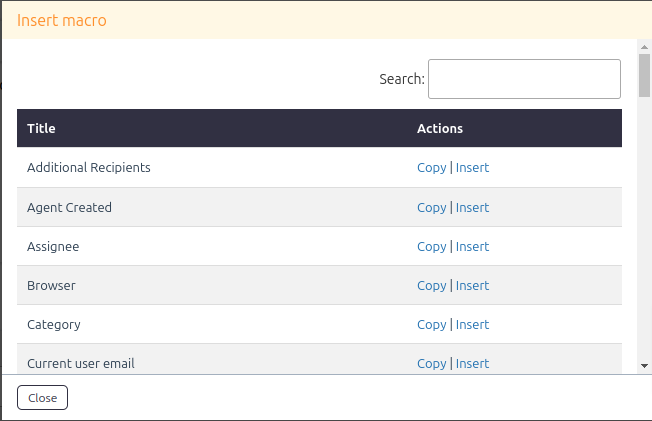
List of available macros
| Macro | Description |
|---|---|
| {{ticket_id}} | Ticket id of current ticket |
| {{customer_name}} | Name of ticket creator |
| {{customer_first_name}} | First name of ticket creator |
| {{customer_email}} | Email address of ticket creator |
| {{last_reply}} | Last reply submitted in the ticket |
| {{last_reply_user_name}} | Name of the Agent/Customer who submitted the last reply |
| {{last_reply_user_email}} | Email of the Agent/Customer who submitted the last reply |
| {{last_reply_user_first_name}} | First name of the Agent/Customer who submitted the last reply |
| {{last_note}} | Last note submitted in the ticket |
| {{last_note_user_name}} | Name of the Agent/Customer who submitted the last note |
| {{last_note_user_email}} | Email of the Agent/Customer who submitted the last note |
| {{last_note_user_first_name}} | First name of the Agent/Customer who submitted the last note |
| {{current_user_name}} | Name of the current user |
| {{current_user_email}} | Email of the current user |
| {{current_user_first_name}} | First name of the current user |
| {{ticket_history}} | Ticket history of reports (description) and some replies, excluding the last reply. The number of replies can be configured in Advanced Settings. |
| {{ticket_history_all}} | Prints all replies and the report (description) of the current ticket. |
| {{ticket_notes_history}} | Prints all notes of the current ticket. |
| {{ticket_history_all_with_notes}} | Prints all replies, notes, and the report (description) of the current ticket. |
| {{ticket_history_all_with_logs}} | Prints all replies, logs, and the report (description) of the current ticket. |
| {{ticket_history_all_with_notes_and_logs}} | Prints all replies, logs, notes, and the report (description) of the current ticket. |
| {{ticket_notes_history_with_logs}} | Prints all notes and logs of the current ticket. |
| {{ticket_url}} | URL of current ticket |
| {{name}} | Name of the ticket creator |
| {{subject}} | Subject of the current ticket |
| {{description}} | Description of the current ticket |
| {{status}} | Status of the current ticket |
| {{priority}} | Priority of the current ticket |
| {{category}} | Category of the current ticket |
| {{assigned_agent}} | Assignee of the current ticket |
| {{date_created}} | Date on which the current ticket has been created |
| {{date_updated}} | Date on which the current ticket has been last updated |
| {{agent_created}} | Agent name who created the ticket on behalf of the customer |
| {{ip_address}} | IP address of the ticket creator |
| {{source}} | Source of the ticket, such as Email Piping, Gravity Form, browser, schedule ticket, IMAP, Gmail, or Microsoft Exchange |
| {{browser}} | Browser used by the customer to create the ticket |
| {{os}} | Operating system of the customer |
| {{add_recipients}} | Additional recipients added to the ticket |
| {{prev_assignee}} | Previous assignee of the current ticket |
| {{date_closed}} | Date on which the current ticket has been closed |
| {{user_type}} | User type as a registered user or guest user |
| {{last_reply_on}} | Date on which the last reply was received in the ticket |
| {{last_reply_by}} | User who last replied to the ticket |
| {{usergroups}} | List of Usergroups of the current ticket creator |
| {{time_logs}} | All timer logs of the current ticket |
| {{time_spent}} | Time spent by the Agent on the current ticket |
| {{sf_feedback}} | Feedback received for the current ticket |
| {{satisfaction_survey_links}} | Satisfaction survey links for the current ticket to get ratings from the user |
| {{satisfaction_survey_url}} | URL of the page where users can rate the support |
| {{rating}} | Rating received for the current ticket |
| {{sla_logs}} | All SLA logs of the current ticket |
| {{basepress_kb}} | BasePress knowledgebase suggestions |
| {{bwl_kb}} | BWL knowledgebase suggestions |
| {{echo_kb}} | Echo knowledgebase suggestions |
| {{helpdesk_kb}} | Helpdesk knowledgebase suggestions |
| {{helpguru_kb}} | Helpguru knowledgebase suggestions |
| {{pressapp_kb}} | Pressapp knowledgebase suggestions |
| {{wp_kb}} | WP knowledgebase suggestions |
| {{betterdocs_kb}} | BetterDocs knowledgebase suggestions |
| {{acronix_faq}} | Acronix FAQ suggestions |
| {{ultimate_faq}} | Ultimate FAQ suggestions |
| {{ticket_url_plain}} | URL of a current ticket for the Backend |
Example
To include the ticket ID and customer name in an email template, add:
{{ticket_id}} {{customer_name}}
SupportCandy replaces these macros with the corresponding ticket information when the content is generated.
Notes / Tips
- Use the Insert macro option to view and insert available macros.
- Enter macros exactly as provided, including the
{{ }}characters. - Macros can be used wherever SupportCandy provides macro support, such as email notifications, print tickets, replies, and schedule tickets.
- The
{{ticket_history}}macro uses the reply count configured in Advanced Settings.