
Overview
The GetResponse integration allows SupportCandy to add customers to a selected GetResponse audience.
You can configure the API connection, target audience, and subscriber tags from the GetResponse settings.
Where to Find
Go to Support → Settings → Email Marketing Tool → GetResponse.
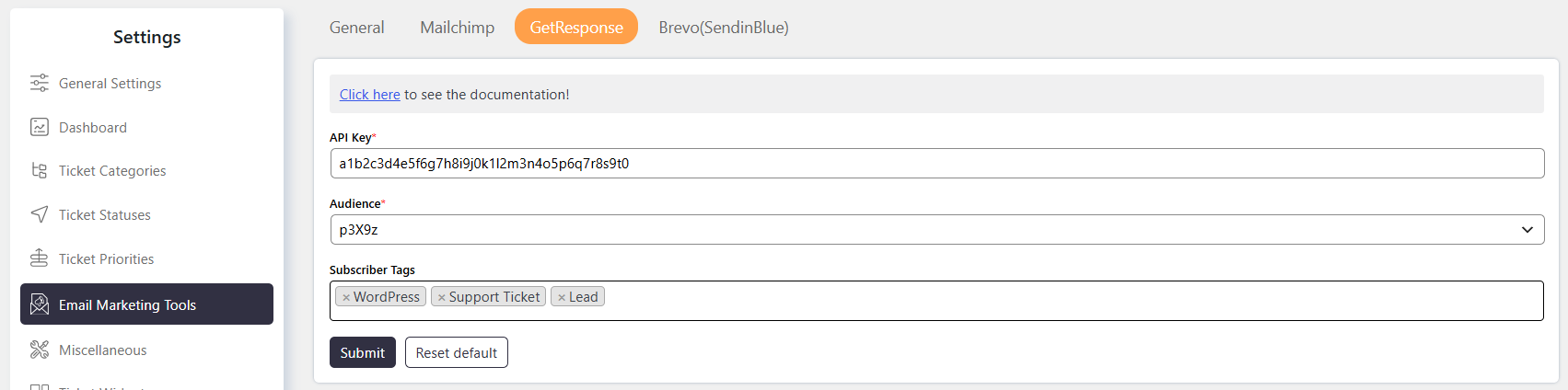
GetResponse API Authentication Guide
API Key
Enter the GetResponse API Key to authorize requests from SupportCandy.
You can generate an API key from the GetResponse API settings.
Audience
Select the Audience where SupportCandy should add new subscribers.
The selected audience determines where subscribers are added in your GetResponse account.
Subscriber Tags
Add Subscriber Tags to categorize subscribers in GetResponse.
Tags help you organize and identify subscribers added through the SupportCandy email marketing integration.