
Overview
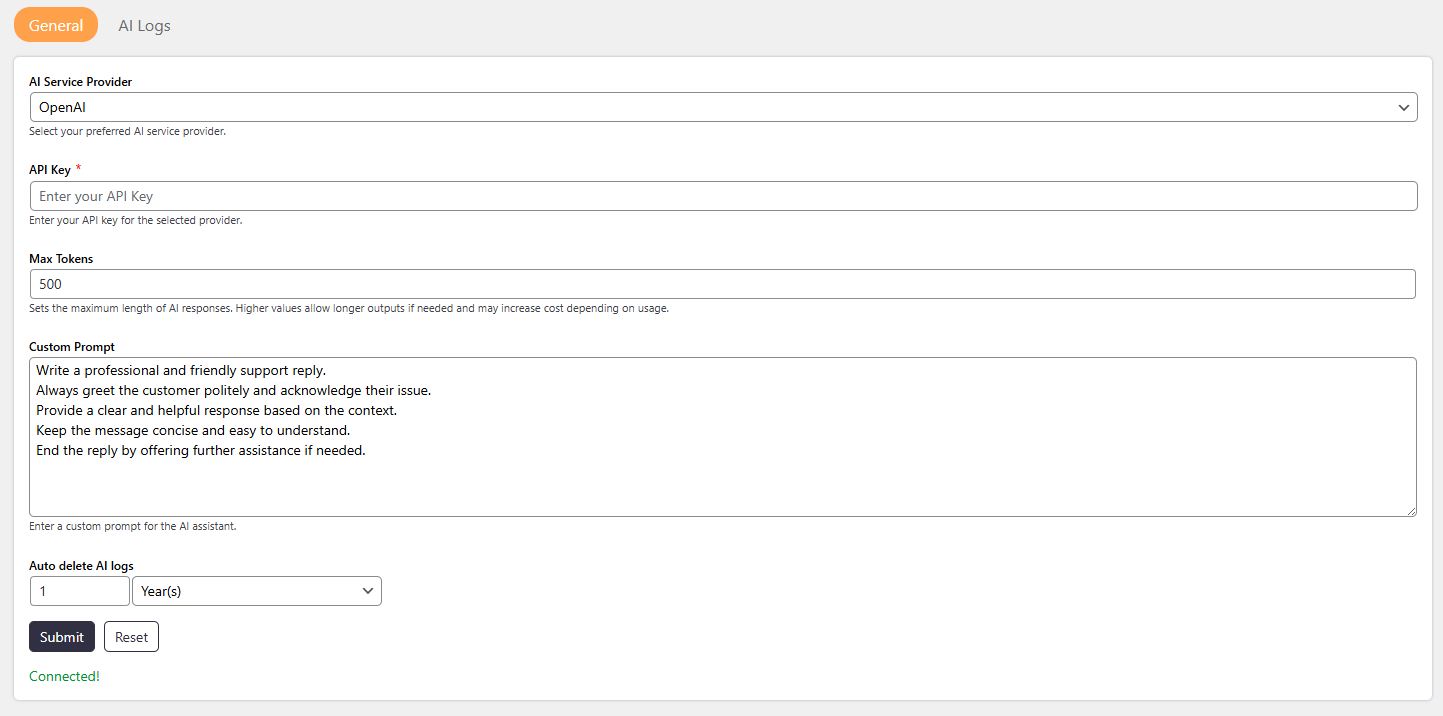
The General settings allow you to configure how the AI Assistant connects to external AI services and controls how responses are generated.
These settings are required to enable AI features such as ticket summaries, polish replies, and more.
Where to Find
Support → Settings → AI Assistant → General
How It Works
The AI Assistant connects to an external AI provider (such as OpenAI or Google Gemini) using an API key.
Once configured:
- The selected provider handles AI requests
- The system controls response length using Max Tokens
- Logs are stored and automatically deleted based on your settings
Step-by-Step Guide
- Go to Dashboard → Support → Settings → AI Assistant
- Open the General tab
- Select your preferred AI Service Provider
- Enter the API Key
- Set the Max Tokens
- Configure Auto Delete AI Logs
- Click on Save Changes
Options / Settings
AI Service Provider
Choose which AI service will be used to generate responses.
Available options:
- OpenAI
- Google Gemini
API Key
Enter the API key for the selected provider.
- Required for authentication
- AI features will not work without it
Max Tokens
Defines the maximum length of AI-generated responses.
- Higher value → Longer responses
- Lower value → Short responses
Note: Higher values may increase API cost.
Auto Delete AI Logs
Automatically deletes AI logs after a selected time period.
You can set the duration in:
- Days
- Months
- Years
Custom Prompt (For AI Responses)
This setting allows you to define a custom instruction that the AI will follow while generating or improving responses.
The custom prompt is especially useful for:
Maintaining a consistent tone (e.g., professional, friendly)
Adding company-specific instructions
Controlling how replies should be written
When using features like Polish Reply (AI), the AI will consider this prompt along with the ticket content.
Notes / Tips
Make sure the API key matches the selected provider
If AI is not working, check API key and provider selection
Keep Max Tokens balanced for cost and quality
Enable auto-delete logs to manage database size