
Overview
The Ticket Summary feature uses AI to automatically generate a quick summary of the conversation within a ticket.
It helps agents quickly understand the issue, previous responses, and overall context without reading the entire thread.
Where to Find
Dashboard → Support → Ticket List → Open any Ticket
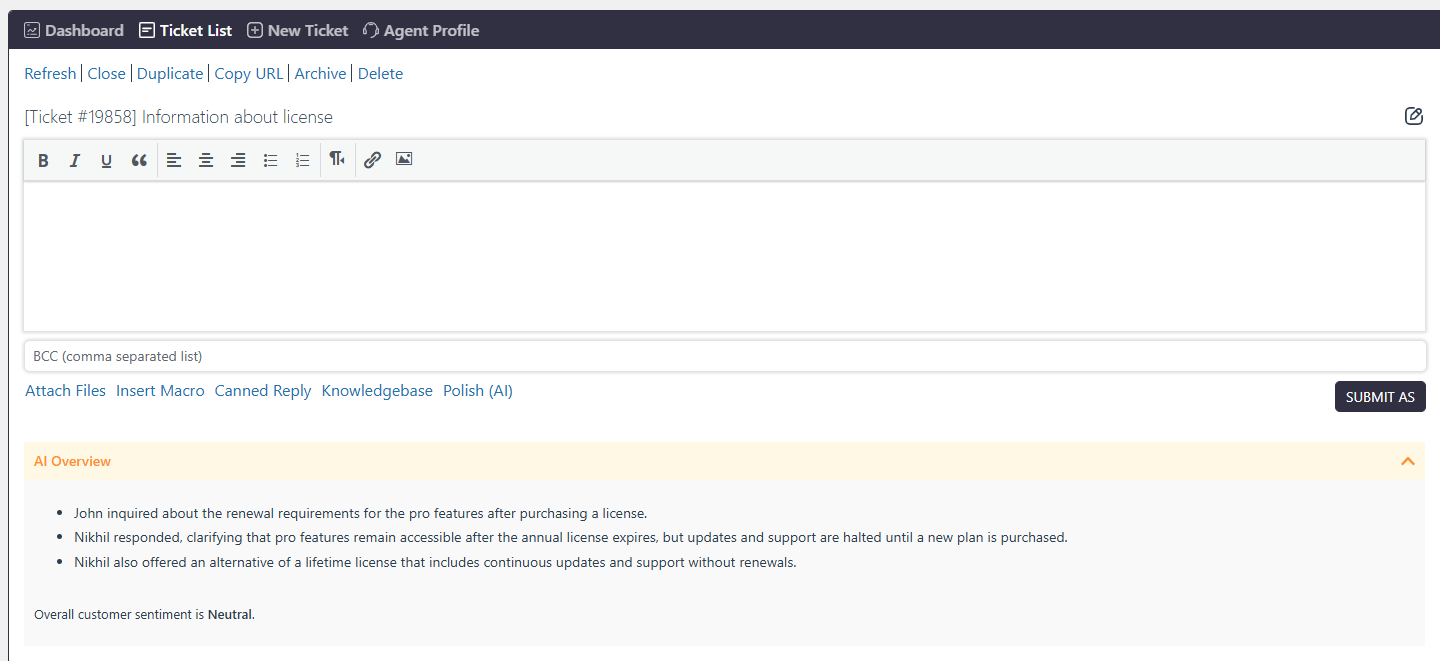
How It Works
The AI Assistant analyzes the full ticket conversation, including customer messages and agent replies.
It then generates:
Key discussion points
Important updates or responses
Overall customer sentiment
This summary is displayed inside the ticket for quick reference.
Note: Only agents who have permission to read tickets can use this feature.
Step-by-Step Guide
- Go to Dashboard → Support → Ticket List
- Open any ticket
- Scroll down to the reply section
- Go to the AI Overview section
- Click Generate button to create a ticket summary
What Information is Included
The AI-generated summary may include:
Main customer query or issue
Important agent responses
Key actions or clarifications
Overall customer sentiment (e.g., Unhappy, Neutral, Happy)
Notes / Tips
This feature saves time by avoiding manual reading of long conversations
The summary is automatically generated based on ticket content
If the ticket is updated, the summary may also change
Ensure AI settings (API key, provider) are properly configured for this feature to work