
Overview
The BetterDocs Training feature allows the AI Assistant to use your BetterDocs knowledge base articles as training data using RAG (Retrieval-Augmented Generation).
This helps the AI provide more accurate and knowledge-based responses using your documentation.
You can use BetterDocs, Tickets, or both together to train the AI Assistant.
Where to Find
Dashboard → Support → Settings → AI Assistant → BetterDocs
How It Works
The system syncs BetterDocs articles and uses them as a knowledge source for AI responses.
Once configured:
- BetterDocs articles are used as training data
- Admin must manually sync articles
- The AI uses this data along with ticket training (if enabled)
- Helps generate more accurate and documentation-based responses
Step-by-Step Guide
- Go to Dashboard → Support → Settings → AI Assistant
- Open the BetterDocs tab
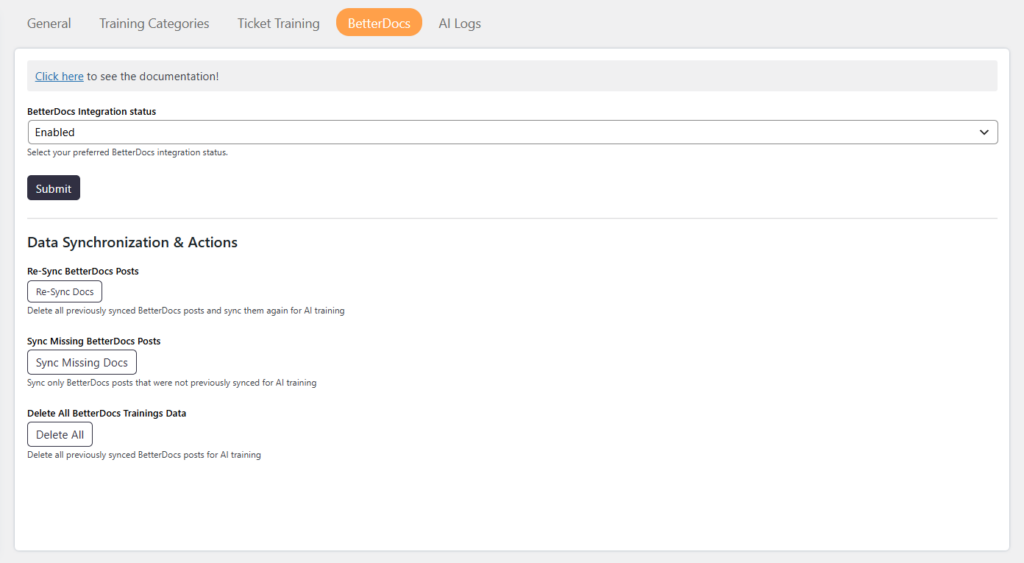
- Enable BetterDocs Integration
- Click on Submit
- Scroll to Data Synchronization & Actions
- Choose a sync option (Re-Sync, Sync Missing, or Delete Data)
Options / Settings
BetterDocs Integration Status
Enable or disable BetterDocs training.
- Enabled → BetterDocs articles will be used for AI training
- Disabled → BetterDocs data will not be used
Data Synchronization & Actions
Re-Sync BetterDocs Posts
Deletes all previously synced BetterDocs data and syncs all articles again for AI training.
Use this when:
- You update or restructure documentation
- You want to refresh all training data
Sync Missing BetterDocs Posts
Syncs only BetterDocs articles that were not previously synced.
Use this when:
- New docs are added
- You want faster sync without reprocessing old data
Delete All BetterDocs Training Data
Deletes all previously synced BetterDocs training data.
Use this when:
- You want to reset documentation training
- You no longer want to use BetterDocs data
How It Works with Ticket Training
You can use both training sources together:
Tickets → Real customer conversations
BetterDocs → Structured knowledge base
Combining both helps AI:
Provide accurate answers
Use real-world context + official documentation
Where to View Training Data
You can view the synced training data at:
Dashboard → Support → AI Training
Notes / Tips
- Enable BetterDocs only if the plugin is installed and configured
- Run sync after enabling the integration
- Use Re-Sync after major documentation updates
- Use Sync Missing for regular updates
- Combine BetterDocs and Ticket Training for best AI results