
Overview
The Ticket Training feature allows the AI Assistant to learn from your existing tickets using RAG (Retrieval-Augmented Generation).
Admins can select which tickets should be used for training based on their status and then sync them with the AI system.
During this process, all sensitive information (PII) is automatically removed to ensure data privacy.
Where to Find
Dashboard → Support → Settings → AI Assistant → Ticket Training
How It Works
The system uses selected tickets to improve AI-generated responses.
Once configured:
- Only tickets with selected statuses are included in training
- Admin must manually sync tickets to apply training
- All synced data is cleaned to remove personal or sensitive information (PII)
- The trained data is stored and used by AI to provide better responses
Step-by-Step Guide
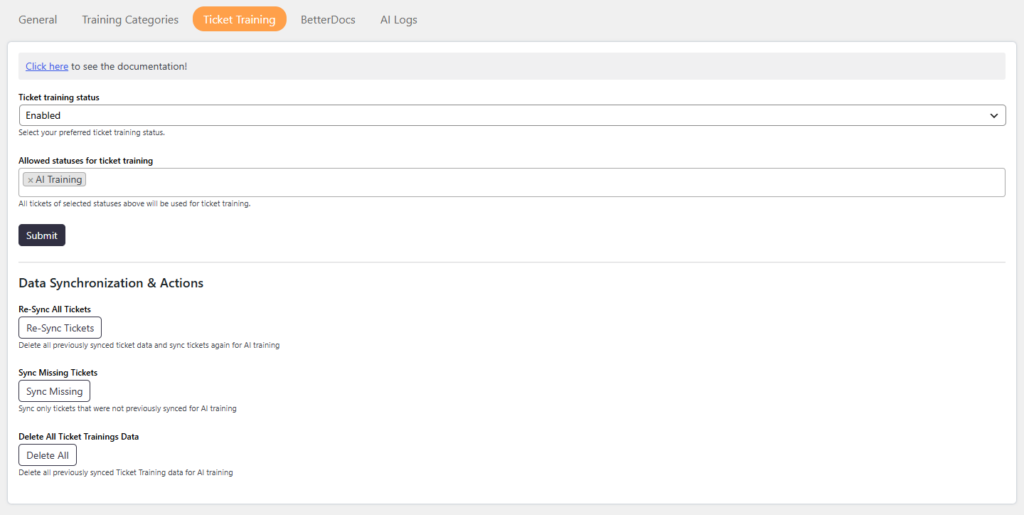
- Go to Dashboard → Support → Settings → AI Assistant
- Open the Ticket Training tab
- Enable Ticket Training
- Select allowed ticket statuses for training
- Click on Submit
- Scroll to Data Synchronization & Actions
- Choose a sync option (Re-Sync, Sync Missing, or Delete Data)
Options / Settings
Ticket Training Status
Enable or disable the ticket training feature.
- Enabled → AI can use ticket data for training
- Disabled → No ticket data will be used
Allowed Statuses for Ticket Training
Select which ticket statuses should be included in training.
Only tickets with selected statuses will be used
Helps control the quality of training data
Data Synchronization & Actions
Re-Sync All Tickets
Deletes all previously synced ticket data and syncs all tickets again for AI training.
Use this when:
You change training settings
You want to refresh all training data
Sync Missing Tickets
Syncs only tickets that were not previously synced for AI training.
Use this when:
New tickets are added
Delete All Ticket Training Data
Deletes all previously synced ticket training data.
Use this when:
You want to reset training completely
You no longer want to use existing training data
Where to View Training Data
You can view the synced ticket training data at:
Dashboard → Support → AI Training
Notes / Tips
- Make sure to select only relevant ticket statuses for better AI results
- Use Re-Sync if data seems outdated or incorrect
- Use Sync Missing for regular updates
- All personal and sensitive data (PII) is automatically removed during training