
Overview
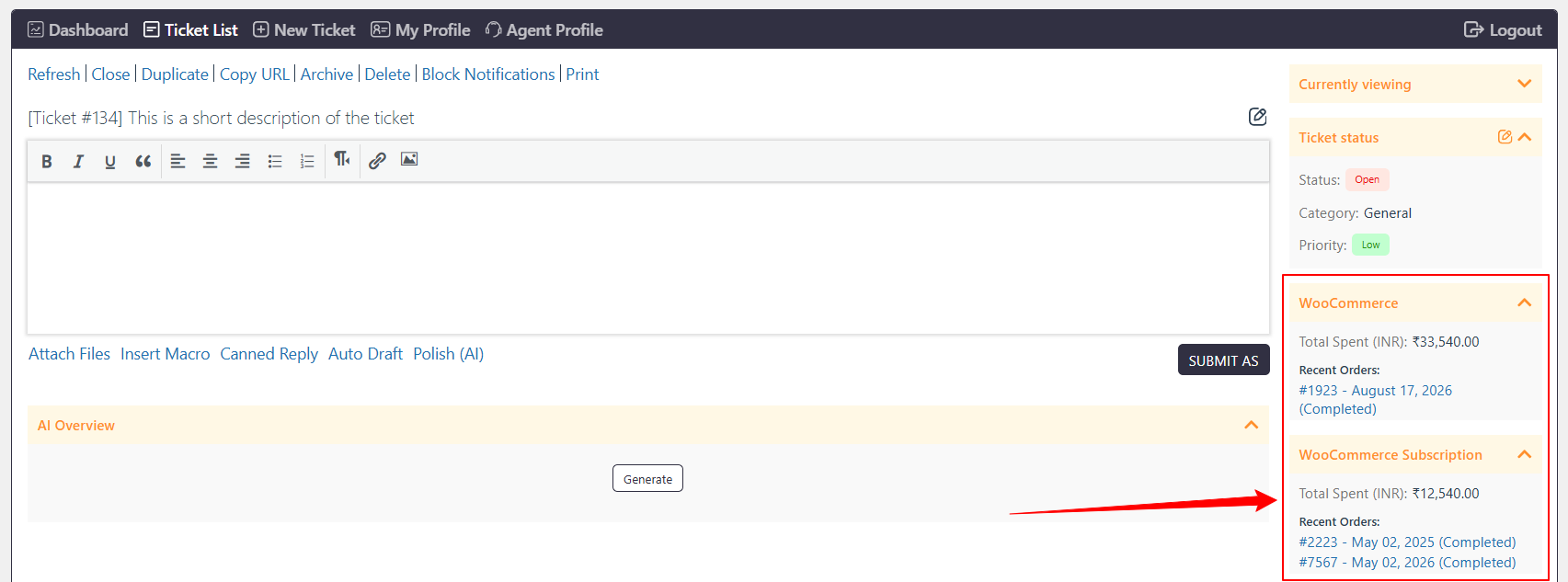
The WooCommerce widget allows Support Agents to view the Ticket creator’s WooCommerce order information directly from the individual Ticket page.
Where to Find
The widget is available on the Individual Ticket Page at:
Support → Tickets → Individual Ticket Page → WooCommerce.
How It Works
The WooCommerce widget displays information about the Ticket creator’s WooCommerce orders, including the total amount spent by the Customer.
Options / Settings
Allowed Agent Role
Controls which Support Agent roles can view the WooCommerce widget on the individual Ticket page.
Example
If the WooCommerce widget is enabled for an Agent role, Agents with that role can view the Ticket creator’s WooCommerce orders and total amount spent directly within the Ticket.
Notes / Tips
- Configure Allowed Agent Role to control which Support Agent roles can access the widget.
- The widget helps Agents review the Customer’s WooCommerce order information while handling a Ticket.